Deprecations
Engine changes with time as new features are introduced and other features get improved or even removed. Since removing features can break existing processes, it doesn't happen overnight.
When a feature is set for removal, first a deprecation note is added that signals the feature will be removed in a future release. Additionally, the workspace adds a deprecation badge to resources containing deprecated features.
Finding Deprecation Notes in Logs
Let's say there is a flow API method that will be removed in the future, hence a deprecation note is added. Every time this method is called by an execution, the execution will log that this feature is deprecated. A simple way to look for deprecation notes within your whole workspace, is to head over to the workspace logs and search for 'deprecat' in the subject field.
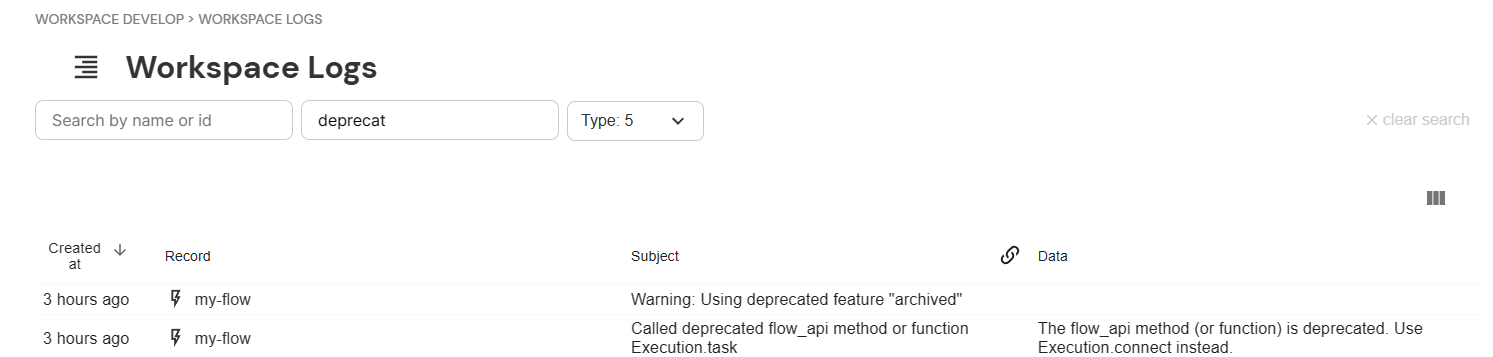
Here's how you can get an overview of deprecation notes in the workspace logs
Deprecation notes are only created if a deprecated flow API method is called. If parts of your scripts contain deprecated features but those parts are not usually executed (for example they cover edge cases that only happen infrequently, or are scheduled only yearly) they might not create deprecation notes.
Similarly, if you delete logs for security reasons, you won't find deprecation notes in the logs.
In these cases you can only find deprecated features by analyzing your scripts e.g. by exporting them and using the search function on an IDE to look for deprecated methods.
Automatic Migration for Schemas
Cloudomation Engine automatically adds a deprecation badge and the button "Migrate deprecations" to resources containing deprecated schemas.
Automatic migration recognizes deprecated schemas (e.g. connector or wrapper inputs) and selected deprecated flow_api call patterns (see Automatic Migration for Flow API Calls below). Deprecated flow_api methods that have no automatic rewrite are found in the logs, as described in the previous section.


The badge and the button
Clicking on the "Migrate deprecations" button attempts to automatically migrate the deprecated schema
Migrating a schema in a connector resource.
Before:
# configuration for a REST connector containing the deprecated parameter `url`
url: https://httpbingo.org/get
After clicking the "Migrate deprecations" button:
# automatically migrated configuration for the connector
host: httpbingo.org
path: get
scheme: https
schema_version: '10.0'
Migrating a schema in a flow resource.
A user creates a flow with the following script:
import flow_api


def handler(system: flow_api.System, this: flow_api.Execution, inputs: dict):
    this.connect(
        connector_type='REST',
        url='https://httpbingo.org/get'
    )

    return this.success('all done')
Upon saving the script get automatically modified to use the correct schema:
import flow_api


def handler(system: flow_api.System, this: flow_api.Execution, inputs: dict):
    this.connect(
        connector_type='REST',
        schema_version='10.0',
        scheme='https',
        host='httpbingo.org',
        path='get',
    )

    return this.success('all done')
Limitations
Some schemas that are evaluated at runtime can not be automatically migrated.
E.g. the url parameter in a REST connector is deprecated and need to be split into host, path and scheme. If
the value of url is dynamic it can not be determined what the values for the new parameters should be.
A schema within a flow script where the schema is evaluated at runtime:
import flow_api


def handler(system: flow_api.System, this: flow_api.Execution, inputs: dict):
    my_url = inputs['url'] # e.g. my_url='https://httpbingo.org/get'
    this.connect(
        connector_type='REST',
        url=my_url # the URL is evaluated at runtime
    )

    return this.success('all done')
If a user clicks on the button "Migrate deprecations" in a resource that contains schemas that cannot be automatically migrated, a warning is shown:

The warning when a schema cannot be automatically migrated
To circumvent this limitation you can manually edit the schema by splitting the url parameter into host, path and scheme and
specifying the schema version.
Manual migration of a schema within a flow script where the schema is evaluated at runtime:
import flow_api


def handler(system: flow_api.System, this: flow_api.Execution, inputs: dict):
    my_url = inputs['url'] # e.g. my_url='https://httpbingo.org/get'
    scheme=my_url.split('://')[0]
    host=my_url.split('://')[1].split('/')[0]
    path=my_url.split('://')[1].split('/')[1]
    this.connect(
        connector_type='REST',
        schema_version='10.0',
        scheme=scheme,
        host=host,
        path=path,
    )

    return this.success('all done')
Automatic Migration for Flow API Calls
Besides schemas, the "Migrate deprecations" button (and the automatic on-save migration) recognizes selected deprecated flow_api call patterns and rewrites them to their current form. A resource whose script contains such a call gets the deprecation badge, and migrating it rewrites the call in place, preserving the surrounding formatting and comments.
The deprecated this.flow(...) call is migrated to system.flow(...).run(...):
A user creates a flow that starts a subflow with the deprecated this.flow() method:
import flow_api


def handler(system: flow_api.System, this: flow_api.Execution, inputs: dict):
    result = this.flow(
        'my-subflow',
        name='run my subflow',
        input_value={'key': 'value'},
    )

    return this.success('all done')
After migrating deprecations the call uses the current form:
import flow_api


def handler(system: flow_api.System, this: flow_api.Execution, inputs: dict):
    result = system.flow('my-subflow').run(
        name='run my subflow',
        input_value={'key': 'value'},
    )

    return this.success('all done')
The rewrite is behaviour-preserving: the first argument (or flow_name=) becomes the flow selector passed to system.flow(...), a flow_by= argument becomes the accessor's by= argument, and every other argument is forwarded unchanged to .run(...). All return-value, wait, and exception semantics are identical to this.flow(...).
The deprecated connector_type='REST' argument to this.connect(...) is canonicalised to connector_type='HTTP':
A user creates a flow that opens a connection using the REST connector-type alias:
import flow_api


def handler(system: flow_api.System, this: flow_api.Execution, inputs: dict):
    this.connect(
        connector_type='REST',
        scheme='https',
        host='httpbingo.org',
        path='get',
    )

    return this.success('all done')
After migrating deprecations the call uses the canonical connector-type name:
import flow_api


def handler(system: flow_api.System, this: flow_api.Execution, inputs: dict):
    this.connect(
        connector_type='HTTP',
        scheme='https',
        host='httpbingo.org',
        path='get',
    )

    return this.success('all done')
HTTP is the canonical name for the general-purpose HTTP-client connector, and REST is a permanent runtime alias that resolves to the same connector, so a script written with connector_type='REST' keeps working. Migrating rewrites the stored script to the canonical name and clears the deprecation badge. This canonicalisation is independent of the schema migration above: a connector_type='REST' call is renamed to 'HTTP' even when the rest of the call is already at the current schema.
Migration on Every Run
Recognised deprecated flow_api call patterns are also migrated automatically each time a script runs. Before an execution starts, Engine rewrites the deprecated call shapes in the script it hands to the runtime — in memory only. The stored script and its deprecation badge stay byte-for-byte unchanged: on-run migration does not write back to the resource.
This keeps deprecated call shapes working: a script that still contains this.flow(...) executes as though it read system.flow(...).run(...), so it continues to run correctly even as the deprecated methods are retired. To remove the deprecation badge and update the stored script, use the "Migrate deprecations" button or the migrate_deprecations action.
On-run migration covers the same set of recognised call patterns and applies the same behaviour-preserving rewrite. A call that cannot be rewritten unambiguously runs unchanged.
Limitations
The migration only rewrites a call when it can determine the flow selector unambiguously. A this.flow(...) call with no resolvable flow selector is left unchanged and reported, so it can be migrated by hand.
Previewing a Migration (Dry Run)
Automatic migrations support a dry run that computes the proposed change and returns it — together with a unified diff of the current versus proposed script or connector value — without modifying the resource. The resource, its deprecation badge, and its logs stay untouched, so a dry run shows exactly what "Migrate deprecations" produces before anything is applied. A dry run is available for every migratable resource: connectors, flows, schedulers and wrappers.
From a flow
The flow API migrate_deprecations method takes a dry_run argument. With dry_run=True it returns a preview dictionary instead of applying the migration:
import flow_api


def handler(system: flow_api.System, this: flow_api.Execution):
    flow = system.flow('my-flow')

    preview = flow.migrate_deprecations(dry_run=True)

    this.log(f'proposed script:\n{preview["script"]}')
    this.log(f'diff:\n{preview["diff"]}')
    this.log(f'remaining errors: {preview["errors"]}')

    # the flow is untouched; apply the migration once the preview looks right
    if not preview['errors']:
        flow.migrate_deprecations()

    return this.success('all done')
The preview dictionary contains:
script(for flows, schedulers and wrappers) orvalue(for connectors): the proposed migrated content.diff: a unified diff of the current versus proposed content (empty when there is nothing to migrate).errors: the parts that cannot be migrated automatically (see the limitations above). An empty list means the migration is complete.has_deprecation: whether the resource still carries a deprecation after the proposed migration is applied.
Calling migrate_deprecations() without dry_run applies the migration.
From the REST API
The migrate_deprecations action accepts a dry_run query parameter:
PATCH /api/latest/flow/<id>/migrate_deprecations?dry_run=true
With dry_run=true the response carries the proposed script (or value for connectors), the diff, the errors and the proposed-state has_deprecation, and the resource stays unchanged. The same query parameter is available on the connector, scheduler and wrapper resources.
From the Console
The "Migrate deprecations" button on a resource runs a dry run first and opens a preview dialog before anything is applied. The dialog shows a unified diff of the current versus proposed content, a summary line stating whether the migration fully clears the deprecation or leaves parts behind, and the list of parts that cannot be migrated automatically. The migration is applied only when the preview is confirmed; cancelling leaves the resource, its deprecation badge and its logs untouched.