Script Visualisation
Engine creates a visual representation of scripts in your flows, schedulers, or wrappers.
Concept
Using static code analysis Engine extracts the control-flow and several key-commands of your scripts. This data is used to create a flowchart.
Features
Child Flow
Child flows are visualised as a squared box with a code icon.
import flow_api

def handler(system: flow_api.System, this: flow_api.Execution, inputs: dict):
    this.flow('child')
    return this.success('all done')
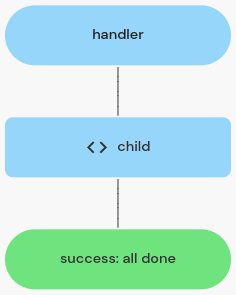
a child flow execution visualised
Child Connection
Child connection are visualised as a squared box with a plug icon.
import flow_api

def handler(system: flow_api.System, this: flow_api.Execution, inputs: dict):
    this.connect(
        'server',
        name='read diskspace',
        script='df -B1',
    )
    return this.success('all done')
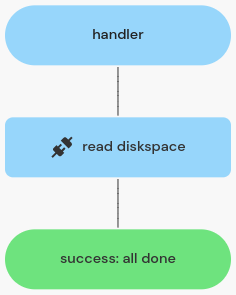
a child connection execution visualised
Condition
Conditions are visualised as a rhomb shape with "true" and "false" lines.
import flow_api

def handler(system: flow_api.System, this: flow_api.Execution, inputs: dict):
    if condition:
        this.flow('child A')
    else:
        this.flow('child B')
    return this.success('all done')
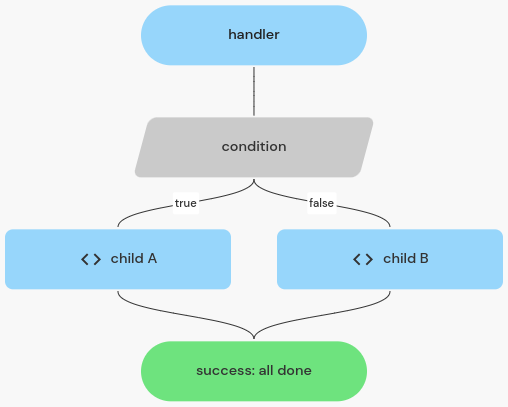
a condition visualised
For Loop
For loops are visualised using a box containing the looping body.
import flow_api

def handler(system: flow_api.System, this: flow_api.Execution, inputs: dict):
    for count in range(3):
        this.flow('child')
    return this.success('all done')
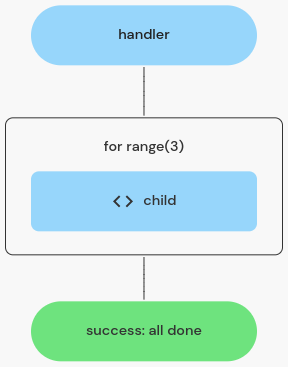
a for loop visualised
While Loop
While loops are visualised using a box containing the looping body.
import flow_api

def handler(system: flow_api.System, this: flow_api.Execution, inputs: dict):
    while condition:
        this.flow('child')
    return this.success('all done')
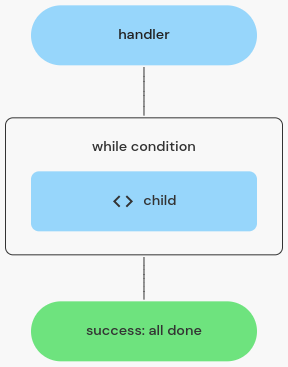
a while loop visualised
Exception Handler
Exception handlers are visualised using a box containing the try body. There are lines for each exception type being caught and one line for the "else" path (no exception).
import flow_api

def handler(system: flow_api.System, this: flow_api.Execution, inputs: dict):
    try:
        this.flow('child A')
    except flow_api.DependencyFailedError:
        this.flow('child B')
    else:
        this.flow('child C')
    return this.success('all done')
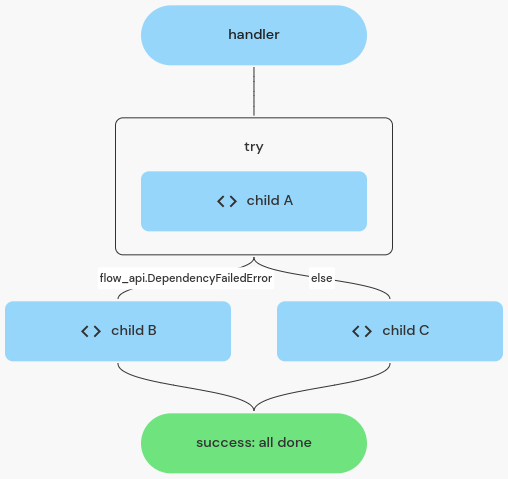
an exception handler visualised
Return
Returning success or error is visualized using a colored rounded square.
import flow_api

def handler(system: flow_api.System, this: flow_api.Execution, inputs: dict):
    if condition:
        return this.error('failed')
    else:
        return this.success('all done')
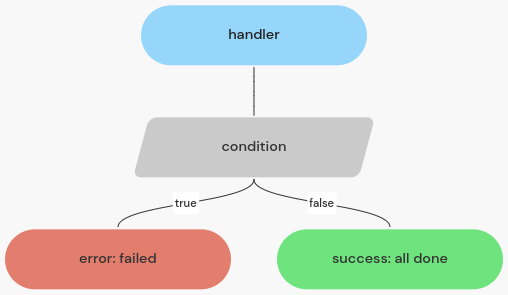
return states visualised
Combined Example
An example using various of the control structures.
import flow_api

def handler(system: flow_api.System, this: flow_api.Execution, inputs: dict):
    server_names = system.setting('monitor-servers').get('value')
    for server_name in server_names:
        output = this.connect(
            server_name,
            name='read diskspace',
            script='df -B1 /',
        ).get('output_value')['report']
        available_bytes = int(report.split(' ')[3])
        if available_bytes < 5*1024**3:  # less than 5 GiB available
            try:
                this.flow('clean caches', server_name=server_name)
            except flow_api.DependencyFailedError:
                return this.error('failed to clean caches')
        else:
            this.connect(
                f'{server_name}-scp',
                name='copy files',
                src='cloudomation:backup.zip',
                dst='/backups/backup.zip',
            )
            break
    return this.success('all done')
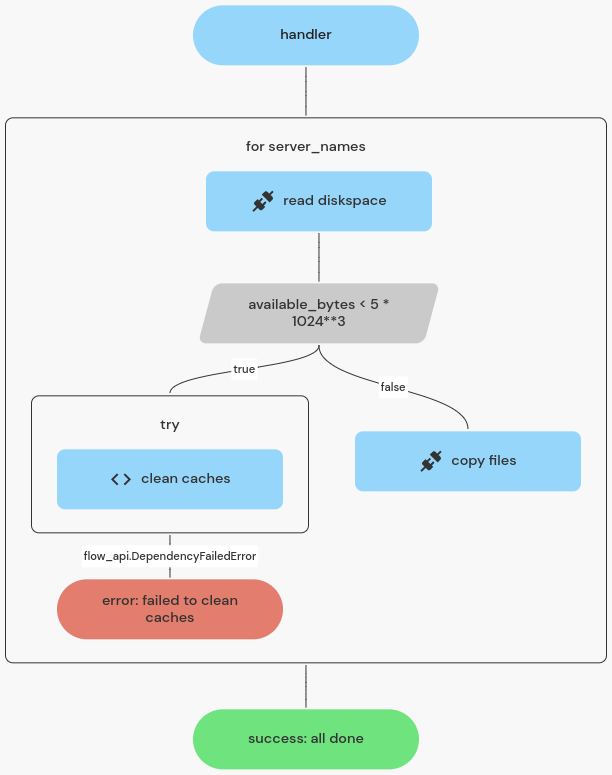
visualisation of example script